
Bookkeeping for Real Estate Investors: 9 Essential Practices for Better Financial Control
Table Of Contents
Toggle
Most Xero vs QuickBooks comparisons treat the decision as global, as if a business in Auckland and a business in Austin are weighing the same trade-offs. They are not. Pricing structure, payroll depth, tax compliance, and even which accountants know the software well enough to advise on it all shift depending on where the business is registered. Skip that variable and the comparison is close to useless. This breakdown walks through pricing, features, and country-specific realities for the US, UK, Australia, and New Zealand.
It began in Wellington, New Zealand, in 2006 and soon became the standard cloud accounting software for NZ, Australia, and large parts of the United Kingdom. Its entire selling point was simplicity – one flat price for each plan, no limit to the number of users, and an interface not designed in 1998. QuickBooks has a much longer history, dating back to Intuit’s desktop software in the early 1990s, and it still dominates the US market today, largely because generations of American accountants and CPAs were trained on it first.
Both platforms now sit fully in the cloud. Both offer invoicing, bank feeds, expense tracking, and reporting. Both have also raced to bolt AI onto their products over the last year, though they’ve taken noticeably different approaches, which we’ll get into below. Where they genuinely diverge is in how they price access, how deeply they support payroll and tax filing in each country, and who actually recommends them on the ground.
| Xero | QuickBooks | |
|---|---|---|
| Founded | 2006, New Zealand | 1992 (Desktop), Online since 2001, USA |
| Strongest Markets | New Zealand, Australia, UK | United States |
| Pricing Structure | Flat monthly fee with unlimited users | Tiered pricing based on user count |
| US Payroll & IRS Filing | Requires a third-party add-on | Native, built-in functionality |
| Multi-Currency Support | Included from mid-tier plans upward | Included from mid-tier plans upward |
| AI Assistant | JAX (Just Ask Xero) with Claude connector | Intuit Assist |
| Entry Price (US) | $25/month | $20/month (Solopreneur) |
| Accountant Familiarity | Strong in New Zealand, Australia, and the UK | Dominant choice in the United States |
That table alone explains why so many businesses run their own version of this QuickBooks vs Xero comparison before signing up. The right answer genuinely depends on where you’re sending your tax return.
New Zealand. This is Xero’s home country, and the local advantage runs deep. Nearly every NZ bank offers a direct feed into Xero, most local accountants trained on it before they trained on anything else, and IRD-specific reporting is built in rather than bolted on. QuickBooks does operate in NZ, but its footprint is small enough that most Kiwi accountants will steer you toward Xero without much debate.
Australia. Same story, different accent. Xero holds a commanding lead here too, helped by native GST handling and deep integration with the ATO’s Single Touch Payroll requirements. QuickBooks and MYOB both compete for the remaining share, but Xero remains the default recommendation from most Australian bookkeeping firms.
United Kingdom. This is the one market where the fight is genuinely close. Xero and QuickBooks are both HMRC-recognized for Making Tax Digital, both handle VAT schemes competently, and both have real UK-based support teams. The deciding factor here usually isn’t the software at all, it’s whatever platform your accountant already uses day to day, since switching them costs more time than switching you.
United States. QuickBooks doesn’t just lead in the US, it structures the market. Payroll, 1099 filing, sales tax by state, and direct IRS-adjacent reporting are all native. Xero has made real progress here, and its plans now include W-9 and 1099 management out of the box, but payroll still routes through a third-party partner like Gusto rather than living inside Xero itself.
India. Worth a quick mention since both brands are used heavily by Indian outsourcing teams and BPOs supporting overseas clients, even though neither company treats India as a core consumer market. If your business is actually based in India and files locally, GST-native software will usually serve you better than either Xero or QuickBooks. This guide is written for businesses operating in the US, UK, Australia, and New Zealand specifically, since that’s where the real Xero vs QuickBooks decision plays out.
Pricing is where most articles get lazy, quoting numbers that were accurate six months ago and calling it a day. Here’s what both companies list on their official US pricing pages right now.
Xero pricing (US)
| Plan | Regular Price | Intro Price (First 3 Months) |
What You Get |
|---|---|---|---|
| Early | $25/month | $5/month | 20 invoices, 5 bills, and unlimited users. |
| Growing | $55/month | $11/month | Unlimited invoices and bills, plus automated bill entry. |
| Established | $90/month | $18/month | Multi-currency support, project tracking, and a 180-day cash flow forecast. |
Every single Xero plan, including the cheapest one, includes unlimited users at no extra charge. That’s a structural decision, not a marketing line, and it’s the single biggest reason growing teams gravitate toward Xero once headcount starts climbing.
QuickBooks pricing
| Plan | Price | Users Included | Best Suited For |
|---|---|---|---|
| Solopreneur | $20/month | 1 User | Freelancers filing Schedule C. |
| Simple Start | $38/month | 1 User | Solo operators who need full double-entry accounting. |
| Essentials | $75/month | 3 Users | Small teams requiring bill management and time tracking. |
| Plus | $115/month | 5 Users | Businesses needing inventory management and project profitability tracking. |
| Advanced | $275/month | 25 Users | Larger organizations requiring advanced analytics and custom user roles. |
QuickBooks charges by tier and caps user access within each one. Need a sixth user on Plus? You’re pushed straight to Advanced at $275, a jump that catches a lot of growing businesses off guard.
There’s also a change worth flagging if you’re budgeting past the next few months. Intuit has confirmed a pricing update for Essentials, Plus, and Advanced subscriptions taking effect August 1, 2026, though Simple Start and Solopreneur pricing stays where it is for now. New customers get a six-month price protection window before the new rate kicks in. If you’re about to sign up for QuickBooks specifically because of a current promo, ask what happens to your bill in month seven, not just month one.
Neither company is shy about promotional pricing, and neither is shy about raising rates once the promo period ends. Xero has bumped its base pricing more than once over the past couple of years, and QuickBooks has raised prices annually since 2023, with the Advanced tier seeing the steepest jumps. Budget for both costing more next year than they do today.
| Feature | Xero | QuickBooks |
|---|---|---|
| Invoicing | Clean interface with quick recurring invoice setup. | More customization options, but a slightly steeper learning curve. |
| Bank Reconciliation | Fast auto-matching with AI-powered reconciliation (beta) available on all plans. | Reliable transaction matching with manual categorization rules. |
| Payroll | Third-party via Gusto in the US; native payroll in New Zealand, the UK, and Australia. | Native US payroll with direct IRS-adjacent filing. |
| Multi-Currency | Included with the Established plan. | Included with Essentials and higher plans. |
| Inventory | Available as an optional add-on (Inventory Plus). | Built into the Plus and Advanced plans. |
| Reporting Depth | Comprehensive standard reports with KPI tracking on the top-tier plan. | Advanced custom analytics on the Advanced plan, powered by Fathom. |
| App Marketplace | 1,000+ integrations with strong global coverage. | 300+ integrations focused on US-specific business tools. |
| Mobile Payments | Native Tap to Pay support on Android and iPhone. | Available through QuickBooks Payments. |
| Cash Flow Forecasting | Forecasts up to 180 days on the Established plan. | AI-powered cash flow forecasting on the Advanced plan. |
A pattern shows up fast once you line the features up side by side. Xero wins on breadth and simplicity. QuickBooks wins on US-specific depth. Neither one is objectively better across the board. They’re built for different regulatory environments, and that shows in nearly every row of that table.
Xero made one of the more interesting product moves in the accounting software space this year by partnering directly with Anthropic. The result is JAX, short for Just Ask Xero, an AI agent living inside the platform that reviews cash flow trends, flags overdue invoices, and recommends next steps without waiting to be asked.
The more notable piece for power users is what happened outside Xero itself. Xero financial data can now connect directly to Claude through an official connector, meaning a business owner or their accountant can open a normal Claude conversation and ask plain-English questions like which customers haven’t paid yet, or whether profit is trending up this quarter, and get an answer pulled from live Xero data instead of a static export. Click through on the answer, and it drops you straight back into the relevant invoice or report inside Xero.
Xero has been explicit that this financial data stays scoped to the individual session and is never used to train Claude’s underlying models, which matters if you’re handling client-sensitive numbers. QuickBooks has its own answer to this with Intuit Assist, an AI layer built directly into the product that scales up by tier, offering deeper agent-style support on Essentials, Plus, and especially Advanced. The difference in approach is worth noting. Xero’s bet is that AI should meet you wherever you’re already working, including outside its own app. QuickBooks has built its AI to live and grow inside the product itself.
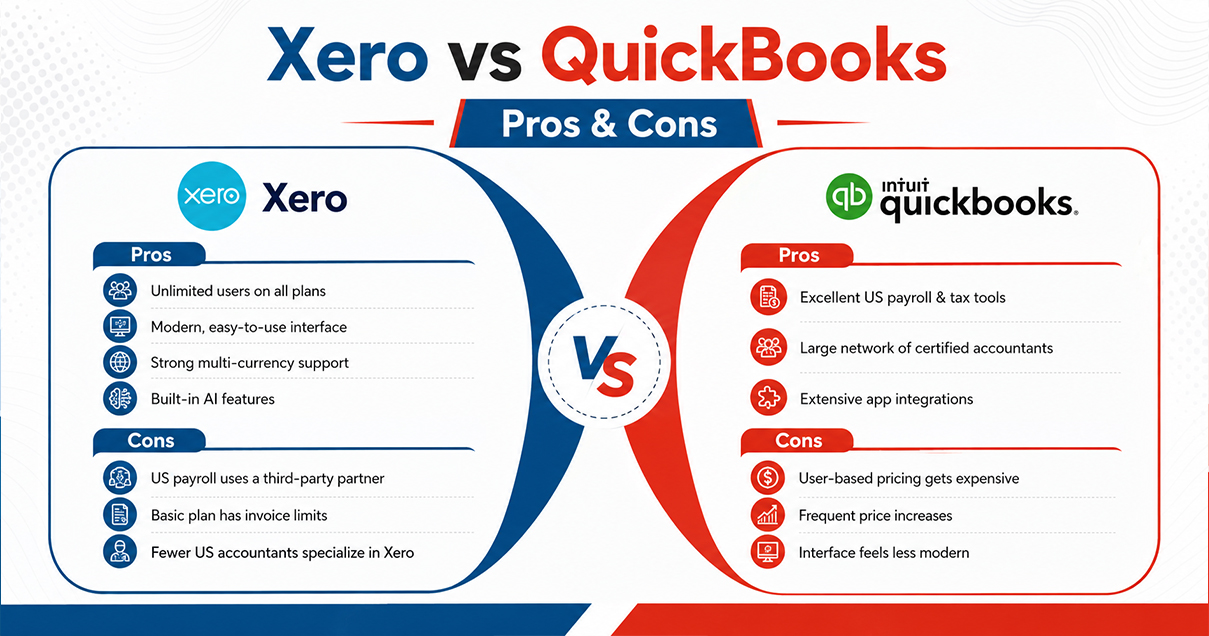
Every Xero vs QuickBooks conversation eventually lands here, on the trade-offs rather than the feature lists.
Xero pros: unlimited users on every plan, a genuinely modern interface, strong native multi-currency support, and an early, well-executed move into Claude-powered AI.
Xero cons: payroll still routes through a third-party partner in the US, the entry plan caps invoices and bills tightly, and it has a smaller bench of accountants trained on it in American markets specifically.
QuickBooks pros: best-in-class US payroll and tax handling, an enormous base of accountants and bookkeepers who already know the product, and a mature app ecosystem built for American compliance needs.
QuickBooks cons: per-user pricing scales expensively once a team grows, annual price increases have been steep and frequent, and the interface still feels dated compared to Xero’s.
Freelancers and solo consultants often end up following whatever their accountant already uses, but for someone choosing without that constraint, the entry-level economics matter. A Xero vs QuickBooks for small business decision usually tips toward Xero once you know you’ll eventually add a bookkeeper or business partner, since that second user costs nothing extra on any Xero plan.
Retailers and product-based businesses tend to land on QuickBooks Plus, mainly because inventory tracking and cost-of-goods reporting are built in rather than bolted on as an add-on, the way Xero’s Inventory Plus is structured.
Service businesses with a small, steady team generally do fine on either platform. The decision here comes down less to features and more to where the business actually operates, since regional support quality and payroll depth swing the outcome more than any single feature does.
Businesses working across borders, invoicing in NZD, AUD, GBP, and USD in the same month, tend to find Xero’s native multi-currency handling noticeably less painful than QuickBooks’ more tiered approach to the same feature.
Ask an accountant in Auckland, Sydney, or London which platform they prefer, and Xero usually wins, largely because of its clean audit trail and the fact that giving a client’s whole team access doesn’t add to anyone’s bill. Ask a CPA in Chicago or Dallas the same question, and QuickBooks usually wins, mostly because that’s the system their firm trained them on and because payroll and 1099 filing sit natively inside the product they already use every day.
Firms serving clients across several of these regions at once often end up running both platforms in parallel rather than picking a single winner firm-wide, which turns the Xero accounting software vs QuickBooks question into something decided client by client instead of once at the top.
Once a business has actually decided on Xero vs QuickBooks, the next question is usually whether switching from the old system is worth the hassle. Moving between the two platforms is entirely doable, but it’s not a weekend project. Chart of accounts structure, historical invoices, and contact records all need careful mapping rather than a straight import, and payroll history in particular rarely transfers cleanly in either direction.
The safer approach is running both systems in parallel through one full reporting period before switching the old one off completely. That overlap gives you a chance to catch mismatched opening balances or duplicate transactions before they become a headache at tax time. Bringing in a bookkeeper who has handled this exact migration before, rather than attempting it solo the first time, tends to be the difference between a clean cutover and a messy one.
This is exactly the space where Xero Bookkeeping Services from a team that genuinely knows both platforms earns its keep. IMCA works across Xero and QuickBooks for clients across the US, UK, Australia, and New Zealand, covering everything from daily reconciliation to full-scale migrations, without pushing clients toward whichever software happens to be easier for the team internally. The approach is built around what the client and their accountant already use, since that path usually gets to clean, audit-ready books faster than forcing a switch for its own sake.
There’s no universal winner here, and any article claiming otherwise is probably selling you something. If your business operates primarily in New Zealand or Australia, or you’re juggling multiple currencies with a team likely to grow, Xero is the stronger structural choice. If you’re based in the US and payroll, sales tax, and IRS-adjacent filing matter more than anything else, QuickBooks still leads by a wide margin. The UK sits in the middle, and there the right call usually comes down to whatever your accountant already knows rather than a feature checklist.
What matters more than either platform is who’s running the books day to day. Software this capable still produces messy numbers in untrained hands, and clean numbers in the right ones. That’s the part every QuickBooks Online vs Xero debate tends to skip past.

We use cookies and similar technologies to improve your experience, personalise content, analyse website traffic, and understand how visitors interact with our website. Some technologies may help us identify businesses visiting our website and improve our marketing and services. Some cookies are essential for website functionality.