Bookkeeping for Real Estate Investors: 9 Essential Practices for Better Financial Control
Table Of Contents
Toggle
Here’s something most business owners find out the hard way. You spend months picking the right accounting software, get the team trained up, and then everything grinds to a halt because the data from your old system looks nothing like what the new one expects. Fields are mismatched. Numbers don’t reconcile. Half your transaction history is sitting in a format the new platform can’t read.
That’s a Data Conversion problem. And it happens more often than it should, mostly because businesses treat it as an afterthought rather than something that needs real planning.
Data Conversion, at the basic level, is the process of taking data in one format and transforming it so it works correctly in another system or environment. But the reason it matters, especially in accounting and finance, goes well beyond moving files around. When your financial records, client histories, tax data, and reporting structures don’t transfer cleanly, the downstream effects show up everywhere. Reports won’t balance. Audits become painful. And that “quick system upgrade” turns into weeks of cleanup.
This piece covers what data conversion actually involves, why businesses in the US, UK, Australia, and New Zealand should care about it more than they typically do, and what a proper conversion process looks like from start to finish.
The simplest way to put it: Data Conversion is what happens when data needs to change its form to fit somewhere new.
That might mean converting a spreadsheet into a database format. It might mean taking financial records from one accounting system’s structure and reshaping them so they make sense in another. It could be as narrow as changing date formats from MM/DD/YYYY (standard in the US) to DD/MM/YYYY (standard in the UK, Australia, and New Zealand), or as involved as remapping an entire chart of accounts from a legacy system into a modern cloud platform.
A few terms that often get used interchangeably but shouldn’t:
Data Conversion is specifically about transforming data from one format or structure to another. The data itself stays the same in meaning. What changes is how it’s encoded, organized, or structured.
Data Migration is about physically moving data from one location or system to another. Conversion is often part of a migration, but you can migrate data without converting it, and convert data without migrating it anywhere.
Data Integration is about pulling together data from multiple sources into a single, coherent picture. Again, conversion might be involved, but the goal is different.
For businesses managing financial records, the most common form of data conversion happens during software transitions. Moving from Xero to a different platform, switching ERP systems, or consolidating accounting data after acquiring another company. In all of these cases, the source data and the destination system don’t naturally speak the same language. Conversion is what makes them compatible.
The technical side of it involves things like data schema mapping, file format transformation, encoding standardization, and data type conversion. In practice, it also involves a lot of decisions about what to do with data that doesn’t fit cleanly, fields that don’t have a direct equivalent in the new system, and records that are incomplete or inconsistent.
The business case for doing this properly isn’t hard to make, but it’s one that gets ignored until something breaks.
There’s also the straightforward operational reality. Business reporting tools, dashboards, and financial summaries are only useful if the underlying data is correct. When data cleansing and proper conversion aren’t done before going live on a new system, teams end up dealing with numbers they can’t fully trust. And running a business on numbers you can’t trust is exactly as difficult as it sounds.
What tends to get underestimated is the cost of not getting it right. Fixing conversion errors after the fact usually costs far more than doing the conversion properly the first time. You’re paying for staff time to investigate discrepancies, potentially for an accountant or specialist to trace errors back through the history, and in some cases for the cost of delays to financial close processes or audit responses.
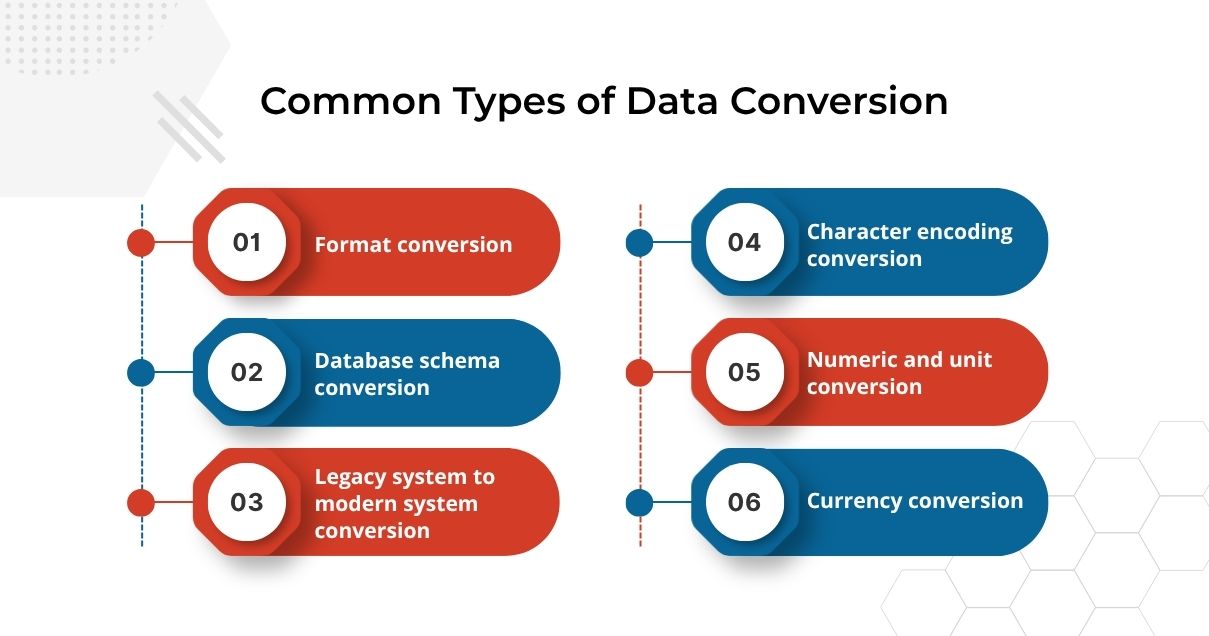
Not every conversion project looks the same. The type of conversion required depends on what systems are involved, what the data looks like, and what the destination environment expects.
Format conversion is probably the most familiar. This is where a file or dataset needs to change its structure. CSV to Excel, XML to JSON, PDF to a structured database record. A lot of finance and accounting work involves data moving between tools that don’t use the same file formats, so this type of conversion comes up constantly.
Database schema conversion is more involved. This is what happens when two systems organize the same kind of information differently at a structural level. Field names differ. Data types don’t match. Relationships between records are set up in different ways. ERP system migrations are a good example of this, where complex relational databases need to be remapped entirely rather than just reformatted.
Legacy system to modern system conversion is something a lot of established businesses face. Older software wasn’t built with the same standards as today’s cloud platforms, and moving data out of legacy systems often requires significant data mapping work because the structures are so different.
Character encoding conversion is less visible but causes real problems when it’s wrong. Different systems store and interpret text in different ways. When you’re dealing with financial data across the US, UK, Australia, and New Zealand, you’re also dealing with different currency symbols, date conventions, and occasionally address formats that need to be handled correctly.
Numeric and unit conversion matters more in international business than most people account for.
Currency conversion, date format standardization, measurement units, tax rate structures, these all need to be handled deliberately when data is moving between systems used in different regions.
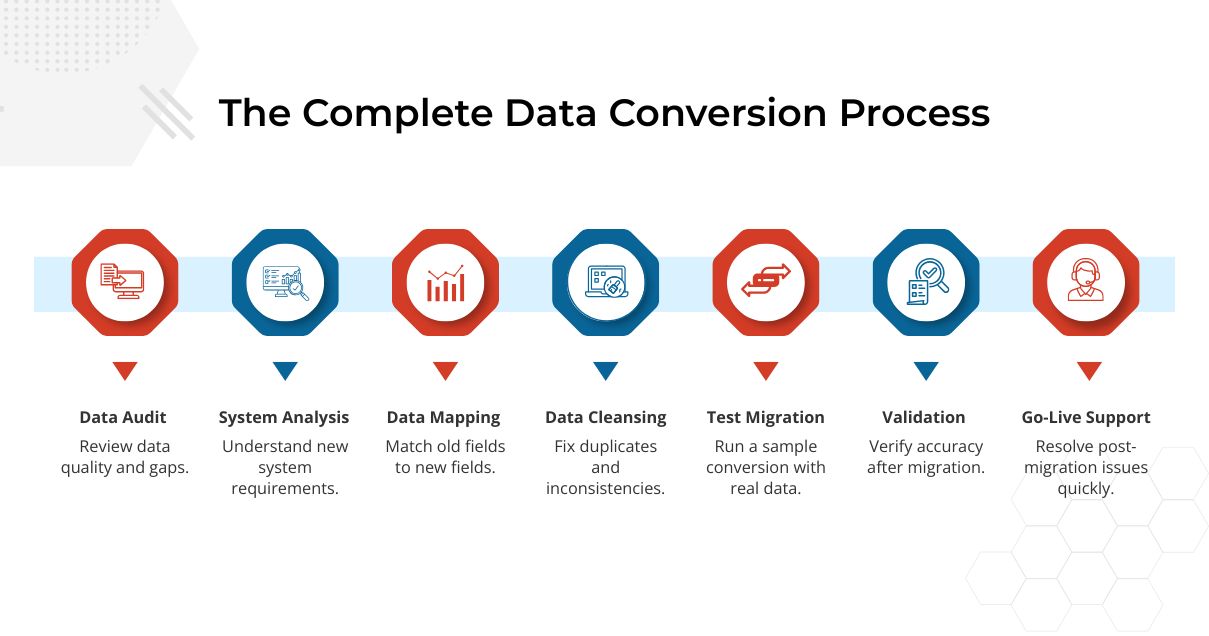
This is where a lot of projects go wrong, and usually for the same reason: steps get skipped because they seem slow or unnecessary until they aren’t.
Define what the destination system actually needs. This sounds obvious, but it often gets skipped in favor of just starting the conversion. The new system has its own data schema, its own required fields, its own validation rules. Understanding those requirements thoroughly before you start mapping is what prevents the majority of rework.
Build the data mapping. This is the core of the conversion work. Each field in the source system needs to be matched to a field in the destination. Where there’s a clean one-to-one match, that’s straightforward. Where there isn’t, which is more common than not, decisions have to be made. Does this field get split? Does it get merged with another? Does it get transformed? Does it get dropped? Those decisions need to be documented because they matter when something doesn’t look right after the conversion is done.
Clean the data before converting it. The temptation is to start converting immediately and deal with quality issues as they come up. That’s usually slower and more expensive than doing the data cleansing first. Duplicates should be resolved, missing required fields filled where possible, format inconsistencies standardized. Converting dirty data just moves the mess into the new system.
Run the full conversion and validate. After the full conversion runs, validation is non-negotiable. For financial data, that means comparing trial balances before and after, checking that totals match, and doing spot-check reviews of individual records. Both the technical output and the functional accuracy need to be verified.
Support the go-live. Conversion doesn’t end when the data moves. The period immediately after go-live is when users start finding things that don’t look right, and having support available to investigate and resolve those quickly is important. It’s also when the conversion documentation earns its value.
When it’s done right, the benefits are concrete and lasting.
The most immediate one is that the new system actually works the way it’s supposed to. That might seem like a low bar, but it’s one that doesn’t get cleared when conversion is rushed or done poorly. A system full of conversion errors is often worse than the old system because at least the old one had errors people knew about.
Beyond that, the conversion process itself tends to improve data quality. The audit and cleansing steps remove duplicates, fix inconsistencies, and resolve issues that have been silently accumulating in the source system for years. The data that comes out of a proper conversion is usually cleaner than what went in.
There’s a real operational benefit too. When data is structured correctly for the system using it, processes that previously required manual work can be automated. Automated reconciliations, scheduled reports, and system integrations all depend on data being in the right format. Proper conversion is what makes those things possible.
For businesses doing cross-border work between the US, UK, Australia, and New Zealand, consistent and correctly formatted data across regions makes multi-currency reporting, consolidated financial statements, and international compliance far more manageable.
And from a longer-term perspective, good conversion work makes the business more scalable. Clean, well-structured data scales better than messy data. As transaction volumes grow and reporting gets more complex, a solid data foundation is what holds everything together.
The source data being worse than expected is probably the single most common issue. Most businesses have no idea how inconsistent their data is until someone looks at it carefully. Fields used for things they weren’t designed for, values entered in five different formats for the same thing, records that are half-complete. All of that has to be dealt with, and it always takes longer than planned.
Complex data relationships create problems that simple mapping can’t solve. Financial data doesn’t exist in isolation. Transactions are linked to accounts, accounts are linked to clients, clients are linked to projects or jobs. When you move data between systems, those relationships need to be preserved correctly. Getting this wrong can look like nothing’s broken until someone tries to pull a report that depends on those links.
Lack of documentation about the existing system is more common than it should be. If nobody fully documented how the source system’s data is structured, or how certain fields have been used over time, data mapping becomes partly a forensic exercise. You’re figuring out the rules by looking at the data itself, which is slow.
Post-conversion reconciliation is where a lot of the stress concentrates. Trial balances that don’t match, opening balances that are off, transactions that appear to have disappeared are all things that come up. Tracking these back to their source in the mapping or cleansing process is often the most time-intensive part of the whole project.
And then there’s the user side. Even a technically successful conversion can run into trouble when users interact with data in the new system and find things that look different from what they expected. Training and clear communication about what changed and why it looks different is part of making a conversion actually land well.
A few things consistently separate the conversions that go well from the ones that don’t.
Document every mapping decision. When something looks off after the conversion, the mapping documentation is what lets you trace it back quickly. Without it, you’re investigating blind.
Do the data audit early and take it seriously. The findings from a thorough audit should drive the project plan, not just add a few items to a checklist. If the audit reveals significant quality issues, that needs to affect the timeline and resource allocation.
Clean before you convert. It’s a slower start, but a much faster finish. Data quality problems that are easy to address in the source system become much harder once they’re embedded in a new one.
Test with real data. Edge cases hide in real data. They almost never show up in test scenarios that were designed to pass. Using an actual subset of your real dataset for testing is what gives you confidence in the full conversion.
Run parallel systems if you can. Keeping the old system live while the new one goes live gives you a comparison point and a fallback. It adds some operational complexity, but it also adds a safety net.
Get people with domain expertise involved. Technical conversion skills and accounting knowledge aren’t the same thing. For financial data, you want someone in the process who understands both. Mapping decisions that look fine technically can have accounting implications that only someone with financial expertise would catch.
Any industry that handles significant volumes of structured data and regularly updates its systems will encounter data conversion as an ongoing reality. But some industries feel it more acutely.
Accounting and finance firms deal with it constantly. Every system upgrade, every merger, every transition to a cloud platform involves financial data that needs to move accurately. The consequences of errors in this space are direct and measurable.
Healthcare organizations face it around patient records, billing codes, and clinical data. The compliance requirements around patient data in the US, UK, and Australia are strict, and conversion errors in those environments aren’t just operationally costly.
Legal firms converting case management systems, billing histories, and client records need data accuracy for professional liability reasons, not just operational ones.
Retail and e-commerce businesses converting product catalogs, inventory data, and transaction histories when switching platforms or expanding into new markets find that data mapping quality directly affects how quickly they can actually operate in the new environment.
Manufacturing companies going through ERP system migrations are dealing with complex, deeply interrelated data sets where errors in conversion can cause production and procurement issues that aren’t immediately obvious.
Professional services firms more broadly, consulting, accounting practices, advisory firms, regularly convert practice management and financial data when growing, merging, or upgrading their tech stack.
The technical side of data conversion can be handled by a lot of providers. What’s harder to find is a team that also understands the accounting implications of the decisions being made during conversion.
When you’re mapping a chart of accounts between two systems, the decision about how to handle accounts that don’t have a direct equivalent isn’t just a technical one. It affects how historical reporting reads, how comparative analysis works, and potentially how certain items are treated for tax purposes. That kind of judgment requires accounting expertise, not just data expertise.
Indian Muneem Chartered Accountant serves firms throughout the US, UK, Australia, and New Zealand which perform data conversion in relation to system transitions, business mergers, and pre-compliance work. The team integrates expertise in structured data conversion and migration along with knowledge about the requirements for financial reporting, regulations and accounting principles relevant in each of these areas.
In practical terms: no nasty surprises after launch, faster reconciliation, and greater certainty that not only the technical conversion, but also accounting correctness of data has been achieved.
Should you be migrating between accounting software solutions, consolidating your financial data in connection with a business acquisition, preparing historical information for auditing, or performing other system migration related to financial data conversion – this would be the type of services you would engage.
While AI does alter some of the basic premises of data conversion, its impact isn’t quite what people think.
For example, intelligent matching tools now allow for automatic detection of similar fields using semantic criteria, significantly accelerating this step of the process. Rather than tediously matching one-to-one hundreds of fields by hand, the software performs an initial match. It cuts time without removing the need for expert review.
Automated data cleansing is improving too. AI-driven tools can identify duplicates, flag anomalies, and catch formatting inconsistencies faster than manual review. A process that used to take days can often be done in hours, at least for the detection side of it. Resolving the issues still requires human judgment.
Real-time data pipelines are becoming more common. Rather than large, one-time batch conversions, businesses are increasingly moving toward continuous integration systems that handle data conversion as data flows between systems. This reduces the disruption of major migrations but introduces its own complexity around ensuring consistency over time.
What hasn’t changed, and won’t: the need for accurate mapping, proper validation, and domain expertise when the data in question carries real business weight. AI tools are good at finding patterns and making suggestions. They’re not good at knowing that a particular tax classification matters in New Zealand but not in the US, or that an account code that looks like a duplicate is actually tracking two genuinely different things. That’s still human work.
Data Conversion tends to get underestimated right up until it causes a problem. Then it becomes the only thing anyone’s focused on.
It’s simple if you follow the rules. Know what you’ve got, know what you want, do a proper mapping, clean your data before converting it, and then test and validate it. That’s the easy part. It just requires more time and effort than most projects allocate for all these tasks.
For business organizations operating in America, England, Australia, and New Zealand, which have to deal with their financial information as they transition between systems, there is simply too much at stake to consider doing this properly an option.

We use cookies and similar technologies to improve your experience, personalise content, analyse website traffic, and understand how visitors interact with our website. Some technologies may help us identify businesses visiting our website and improve our marketing and services. Some cookies are essential for website functionality.